
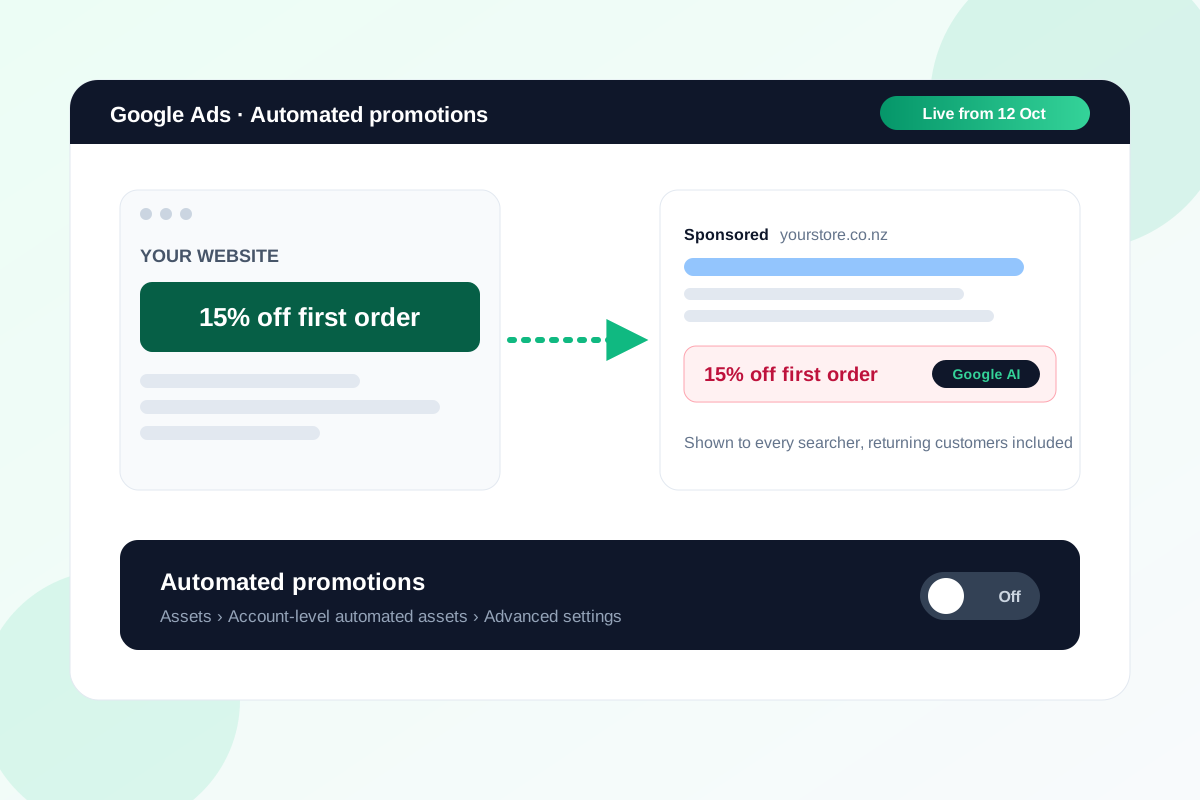
Since 12 October, Google Ads can find the deals on your website and turn them into promotions in your ads on its own. You didn't create them, and unless you've checked, you probably don't know which ones it picked.
For NZ and AU stores the timing is awkward. The next six weeks are full of codes that were never meant for everyone: first-order discounts, VIP codes, and sale prices that end at midnight on a Sunday.
Here's how it works, how to see what Google added, and when I'd switch it off.
What Google is doing
Google emailed advertisers in early October to say automated promotions would start on 12 October, switched on by default. The setting lives at account level, under account-level automated assets.
According to Google's help page, these promotions show on Search and Performance Max campaigns that have location assets and no manual promotion running. Google takes the offer from your site and puts it in the ad, much like it already writes headlines from your landing pages.
Online-only stores aren't automatically safe
The location asset rule sounds like it leaves out online-only stores. It might not.
Google's help page says that if you haven't added locations, Google Ads may match your business to known locations using things like your landing pages. If you have a showroom, a pickup point or a Google Business Profile, check whether location assets are now attached to your campaigns.
Why I don't want it on before Black Friday
The idea is fine. The timing and the lack of control are what worry me.
- Codes leak. A 15% first-order code sitting in your site banner can end up in ads shown to returning customers who would have paid full price.
- Offers go stale. If your BFCM sale ends Sunday night, you're relying on Google to notice before it keeps advertising it on Monday.
- The fine print disappears. "Excludes sale items" rarely makes it into an ad.
- Your results get harder to read. If a promotion turns up in your ads without you knowing, a jump in conversion rate looks like your new landing page worked.
How to see what Google has added
- In Google Ads, open Assets from the Campaigns menu.
- Filter by asset type Promotion.
- Look at the Added by column. Google's promotions are labelled Google AI.
Compare the offer text and dates with what's actually live on your site. If anything is wrong, or shouldn't be public, you have your answer.
How to turn it off
- Go to Assets in the Campaigns menu, open the three-dot menu and choose Account-level automated assets.
- Open Advanced settings.
- Set Automated promotions to Off, and give a reason if it asks for one.
There's a softer option too. Google skips any campaign that already has a manual promotion running, so adding your own promotion asset to your main campaigns keeps Google's version off them while you control the wording and dates.
Selling into Australia? Check Merchant Center as well
Merchant Center has its own automated promotions, separate from the Google Ads setting. Google lists Australia in its closed beta for that feature, so check your promotions in Merchant Center too. Switching off the Google Ads setting won't touch them.
What to do this week
- Check Promotion assets with Added by: Google AI in every account you run.
- Lock in your BFCM offers now and add them as manual promotion assets with exact start and end dates.
- Switch automated promotions off at account level, unless you're happy for every code on your site to be public.
- Move first-order and VIP codes out of site-wide banners and into email or a popup.
- Note the date in your reporting, so a conversion jump in late October gets credited to the right thing.
My view: leave it off until after Black Friday, run your own promotion assets, and look at it again in January when less is riding on it.
If you want a second set of eyes on what Google is pulling from your store, send me the store and I'll tell you what I'd switch off.
Sources
- About automated promotions, Google Ads Help
- About account-level automated assets, Google Ads Help
- Manage automated promotions, Google Merchant Center Help
- Common Thread Collective, on Google's email to advertisers about the 12 October start
Check what Google is pulling from your site before Black Friday.
Send the store URL. I'll reply within one business day (Christchurch time) with what I'd switch off and the promotion assets I'd set up instead.
Get a free store audit