
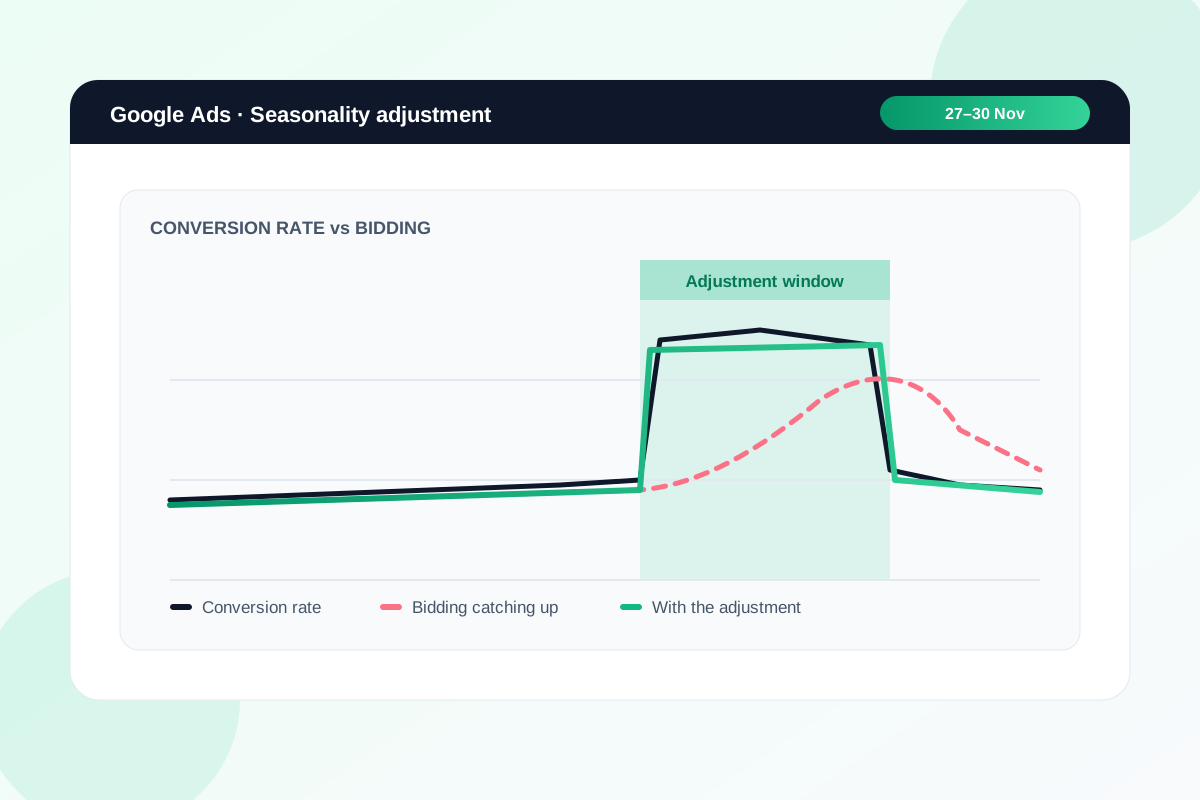
Smart Bidding learns from the past few weeks. On the Friday of Black Friday, your conversion rate can jump overnight, and the bidding takes time to catch up. By the time it does, the sale's half over.
Google has a setting built for exactly this, and it's easy to miss because it sits outside your campaign settings. It's called a seasonality adjustment.
Here's what it does, when it's worth using for BFCM, and how I'd set it without overdoing it.
What a seasonality adjustment does
A seasonality adjustment tells Smart Bidding to expect a change in conversion rate for a set window. You give it the dates and roughly how much you expect conversion rate to rise, and it bids for that from the first hour.
When the window ends, bidding goes back to normal by itself. You don't need to add a negative adjustment afterwards.
It works with Search, Shopping and Display campaigns on Target CPA or Target ROAS, and with Performance Max on any bid strategy.
When it's worth using
Google is clear that Smart Bidding already handles normal seasonality, so this is only for big, short jumps. It says adjustments work best for events of 1 to 7 days and may not work as well beyond 14.
Black Friday to Cyber Monday fits that well. A month-long "Black November" doesn't.
The other thing you need is evidence. If last year's BFCM conversion rate was clearly higher than the fortnight before it, you have a number to work from. If you're running a sale for the first time, I'd skip the adjustment and lean on budget instead.
How I'd set it
- Pull last year's conversion rate for your BFCM days and for the two weeks before. Work out the lift.
- Use less than that. Google's own example adds up to the full historical lift, but I'd rather under-call it and let bidding do the rest than overpay for a week.
- Set the window to the days your offer actually runs, such as Friday 27 to Monday 30 November. Don't stretch it across the whole of November.
- Scope it to the campaigns that carry the sale. Brand campaigns and anything without the offer can stay out.
- Check the start and end times line up with when your sale goes live in NZ time, not just the dates.
Google's setup guide puts it under Tools → Budgets and bidding, in the seasonality adjustments section. Choose conversion rate as the adjustment type, set the dates and scope, then enter your expected change.
If your sale starts early
Plenty of stores open Black Friday deals a week or more before the day itself. A sale running 20 to 30 November is 11 days, which is already past the length Google says works best.
In that case I'd keep the adjustment to the days you expect the biggest jump, usually the Friday through to Cyber Monday. For the early days, let Smart Bidding pick up the change on its own, and watch it daily.
What it doesn't do
It changes how hard Smart Bidding bids. It doesn't raise your budget.
If a campaign is already limited by budget, the adjustment has nowhere to go. Raise budgets for the sale days separately, and check them each morning of the sale, because Black Friday traffic can use up a daily budget early in the day.
It's also not a fix for broken tracking. If conversions aren't recording properly, an adjustment just tells Smart Bidding to expect more of the wrong thing.
What to do this week
- Compare last year's BFCM conversion rate with the fortnight before it, per campaign if you can.
- Decide which campaigns carry the offer and when it starts and ends.
- Create the seasonality adjustment now, scheduled for the sale window, with a conservative number.
- Plan budget increases for the same days, and who checks spend each morning.
- Test a purchase end to end and confirm the conversion shows in Google Ads before the sale starts.
If you want a second set of eyes on your BFCM bidding setup, send me the store and I'll tell you what I'd change before the 27th.
Sources
- About seasonality adjustments, Google Ads Help
- Create a seasonality adjustment, Google Ads Help
- Effectively use Smart Bidding with Shopping and Performance Max campaigns, Google Ads Help
Get your BFCM bidding set before the 27th.
Send the store URL. I'll reply within one business day (Christchurch time) with what I'd change in your Google Ads before Black Friday.
Get a free store audit